A "repackaged" iPhone is a used or refurbished device put back in the box and sold as new. Here's what repackaging looks like, and how to spot it before you buy. It's a scenario we hear in the shop month after month: a customer brings in an iPhone "bought new" six months ago, over something small — glass, charging, the speaker. We open the phone and find something inside that doesn't match "new" at all: signs it was opened before, a replacement screen, a battery from a different batch. That's when the customer finds out, right there on our counter, what they actually paid for as a new device. There's a settled term for phones like this on our market: "repackaged" ("pakovan"). This article explains what that term means, what repackaging looks like technically, how a device like this gives itself away, and what you can check before buying — most checks take under ten minutes. One important caveat: we're writing about a pattern, not about specific sellers. We're not claiming who does this; we're describing what we find in devices that come through our door. 
What "repackaged" means
"Repackaged" is trade slang for a device that's already been used — or assembled from parts — then cleaned up, polished, put back in a box with fresh wrap and stickers, and sold at the price of a new one. The buyer pays for a new phone and gets a used one; the seller pockets the difference in value. One distinction matters here. A refurbished phone is not, by itself, a scam. Devices that have been serviced, checked and sold with a clear "refurbished" label — at a lower price, with a warranty — are a legitimate part of the market; Apple itself sells devices this way through its Certified Refurbished programme. The scam happens the moment a refurbished or used device is labelled and charged for as new. The problem, in other words, isn't the phone's condition — it's the lie about it. ## What repackaging looks like
Repackaging doesn't take much: boxes and serial-number stickers can be printed, and clear wrap can be sealed with an ordinary heat-sealing machine. The result looks convincing at first glance — which is exactly why the first check is a bit of a paradox:
Plastic wrap on a newer iPhone's box is itself a red flag. Since the iPhone 13 (autumn 2021), Apple hasn't shrink-wrapped its boxes in plastic — the original box is sealed with paper tape you tear open by pulling a tab. A "new" phone from a recent generation, tightly wrapped in shiny plastic film, didn't leave the Apple factory looking like that. But an intact paper seal proves nothing in the other direction either: replacement box seals — and printed boxes with any serial number you like — are sold online for pennies. Packaging, however convincing, can only expose a fake; it can never confirm a phone is new. The second thing repackaging has to solve is the serial number: the sticker on the box needs to match the number in the phone. More careful repackagers know this and print the sticker to match the device — so a matching box and phone isn't proof the device is new, but a mismatch is solid proof something's wrong. The third layer is the small details repackagers most often slip on: a cable from a different source, paperwork that doesn't match the market it's sold in, a missing or visibly used SIM-tray tool. ## How the truth comes out once it reaches a repair bench
With a well-executed repackaging job, the outside gives nothing away — which is exactly why people usually only learn the truth the first time the phone comes in for a repair. Once a device is opened, its history reads itself: tool marks on the screws near the charging port, glue that wasn't applied at the factory, marks from previous work on the frame, parts whose batch numbers don't match. To an eye that looks at this every day, the difference between a factory-assembled device and one that's been opened since is obvious. iOS can speak up before we even open the phone. The iPhone keeps its own parts history — Parts & Service History — which on current iOS 26 sits exactly where it's always been: in Settings, under General → About (tracked since iOS 15.2). If a fitted part isn't recognised as genuine, it's flagged "Unknown Part"; on newer models, iOS can even show a warning that it can't verify the part. A buyer of a "new" phone with that label sitting in Settings is holding proof in their hand — nobody just told them where to look. 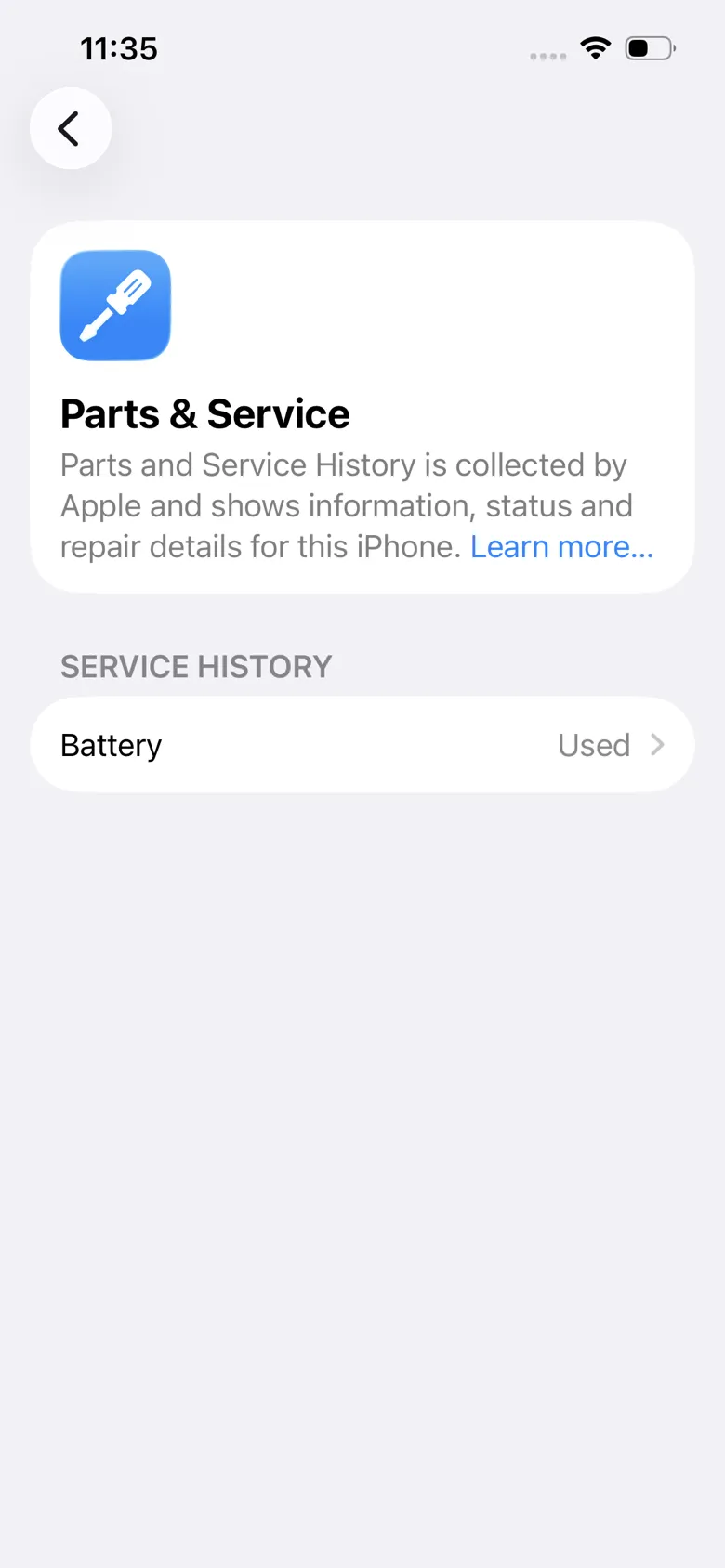
The third route to the truth is the battery: a "new" phone whose Battery Health visibly drops within the first few weeks almost certainly isn't new. We've covered that technique on its own — faked Battery Health readings on iPhone — because the same trick shows up on repackaged devices too, making a worn battery look new on the day of the sale. ## What to check before you buy
The order here is deliberate: from checks you can run yourself, to the one that needs a repair shop. - The serial number in the phone. Settings → General → About. Compare it with the sticker on the box. A mismatch is an instant disqualifier. - Apple's coverage check. On Apple's official coverage page (checkcoverage.apple.com), enter the serial number. On a genuinely new, unactivated device, the warranty clock hasn't started yet. If the check shows coverage has been running for months, or has expired, the phone was activated long before it was offered to you as new — this is the single strongest check on this list, and it takes a minute. - Parts & Service History. Settings → General → About — the same place on every version, from iOS 15.2 through the current iOS 26 (battery history since iPhone XS/XR, screen since iPhone 11, camera since iPhone 12). On a new phone, this section is empty or absent. Any entry — especially "Unknown Part" — means a part has been replaced. - Battery data. A new phone shows 100% Battery Health and only a handful of charge cycles. On iPhone 15 and newer, check the Cycle Count and first-use date too — on current iOS 26 they're under Settings → Battery → Battery Health (available since iOS 17.4); a first-use date older than the "purchase" date ends the discussion. - Box and wrap. Tight plastic film on a model newer than the iPhone 12 doesn't come from the Apple factory. Original boxes on recent generations open by tearing paper tape. But even a neat seal proves nothing — replacements are sold online, so packaging can only disqualify a device, never vouch for it. - A pre-purchase check at a repair shop. The only check that sees the inside. We offer this as a separate paid service (check the price and book by phone): we check the parts history, read the battery data with a service programmer, look for signs the phone was opened, and tell you exactly what you're buying. A seller who's selling exactly what they claim won't mind this kind of check. ## What to do if you've already bought a "repackaged" phone
First, pin down the facts while they're fresh: keep the listing, the messages and the receipt, and screenshot the coverage check and the parts history. With that evidence, you can pursue whatever you're entitled to as a buyer — and the gap between what you paid for as "new" and what you actually got is exactly what that conversation is about. Second, find out the phone's real condition. A shop inspection gives you a clear picture: what's genuine, what's been replaced, and whether anything needs upgrading to a better part. If it does — screen replacement and battery replacement are everyday services for us with clearly published prices; for iPhone screen replacements the range currently runs 5,500 – 78,000 RSD, and the full breakdown is in the price list. Third, if you don't want to keep the phone after all this — we buy used iPhones with a fair inspection and a price that matches the device's real condition, not the one on the box. ## FAQ — frequently asked questions
What exactly does a "repackaged" iPhone mean? It's a used device, or one assembled from parts, put back in a box with fresh wrap and stickers and sold as new. It's slang specific to our market, but at its core it describes deceiving the buyer about a device's condition — the buyer pays full price for a new phone and gets a used one. ### Is every refurbished iPhone a scam? No. A refurbished device sold with a clear "refurbished" label, at a lower price, is a legitimate purchase — Apple sells devices this way itself through its Certified Refurbished programme. The scam is specifically selling a refurbished or used device as new, at a new-device price. ### How can I check in a minute whether an iPhone is genuinely new? Enter the serial number (Settings → General → About) on Apple's coverage-check page, checkcoverage.apple.com. If the device is new and unactivated, the warranty clock hasn't started; if coverage is already running or has expired, the phone was activated earlier — so it isn't new. ### What is Parts & Service History and what does it tell me? It's the parts history the iPhone has tracked on its own since iOS 15.2 — and on current iOS 26 it's in the same place, Settings → General → About. It shows whether the battery, screen or camera has been replaced, and whether the fitted part is genuine ("Genuine Apple Part"), a genuine part from another device ("Used"), or unrecognised ("Unknown Part"). On a new phone, this history is empty. Keep in mind its limit too: some equipment can hide the trace of a replacement, so a clean history isn't absolute proof — a physical inspection is. ### My "new" iPhone shows Unknown Part — what does that mean? It means the phone has a part iOS can't confirm as genuine Apple — most often a replacement screen, battery or camera. On a device sold as new, that's direct proof it was opened before and that you weren't sold what you paid for. Save a screenshot as evidence for the conversation with the seller. ### Can you check a phone before I pay for it? Yes, and we do this regularly — a pre-purchase check is a paid service, check the price by phone before you come in (065/362-61-31). Bring the seller to our shop in New Belgrade, the check is quick, and you'll get a clear answer: what's genuine, what's been replaced, and whether the device is actually new. You can book a slot here. ## Buying with no risk starts with a check
A "repackaged" phone counts on a rushed purchase: wrap, box and good looks doing the work instead of any real check. Five minutes with Settings and the serial number rules out most of these scams, and a shop inspection rules out the rest. We've worked on phones since 2004, and we run these checks every day — call to check the price. Book a slot or call now: 065/362-61-31.