A 100% Battery Health reading doesn't mean a new battery. Battery data can be rewritten with a tool in a few minutes — here's how the scam works and how it gives itself away. You buy a used iPhone. The listing says "battery is great, Battery Health 100%." The phone is three years old, the battery reads like it just left the box — and the price is higher because of it. A few days after you buy it, the number starts sliding: 97, 93, 86… within two weeks it settles somewhere near the real value and stays there. You didn't do anything wrong, and you didn't "ruin" the battery with your charger — based on everything we see on the bench, the percentage was artificially inflated before the sale. We see phones like this regularly in our shop, both on repairs and through buying used iPhones, where devices with a doctored percentage sometimes come from people who were fooled themselves and don't know what they're selling. This article explains how the trick works technically, why it exposes itself within days, and exactly what you can check before you hand over your money. We're writing about a pattern, not naming names — but the pattern is common enough that it's worth talking about openly. ## Where the battery health number comes from
To understand the scam, you first need to know where the percentage actually comes from. The battery in an iPhone isn't just a cell with two contacts. Its flex cable carries a small piece of measuring electronics (known in the trade as a "gas gauge" chip) that counts charge cycles, measures voltage, current and temperature, and uses that to track the cell's real full capacity. iOS reads that data and displays it as Battery Health — on current iOS 26 that screen sits under Settings → Battery → Battery Health (on iPhone 14 and older it's called Battery Health & Charging), and the key figure on it is Maximum Capacity. 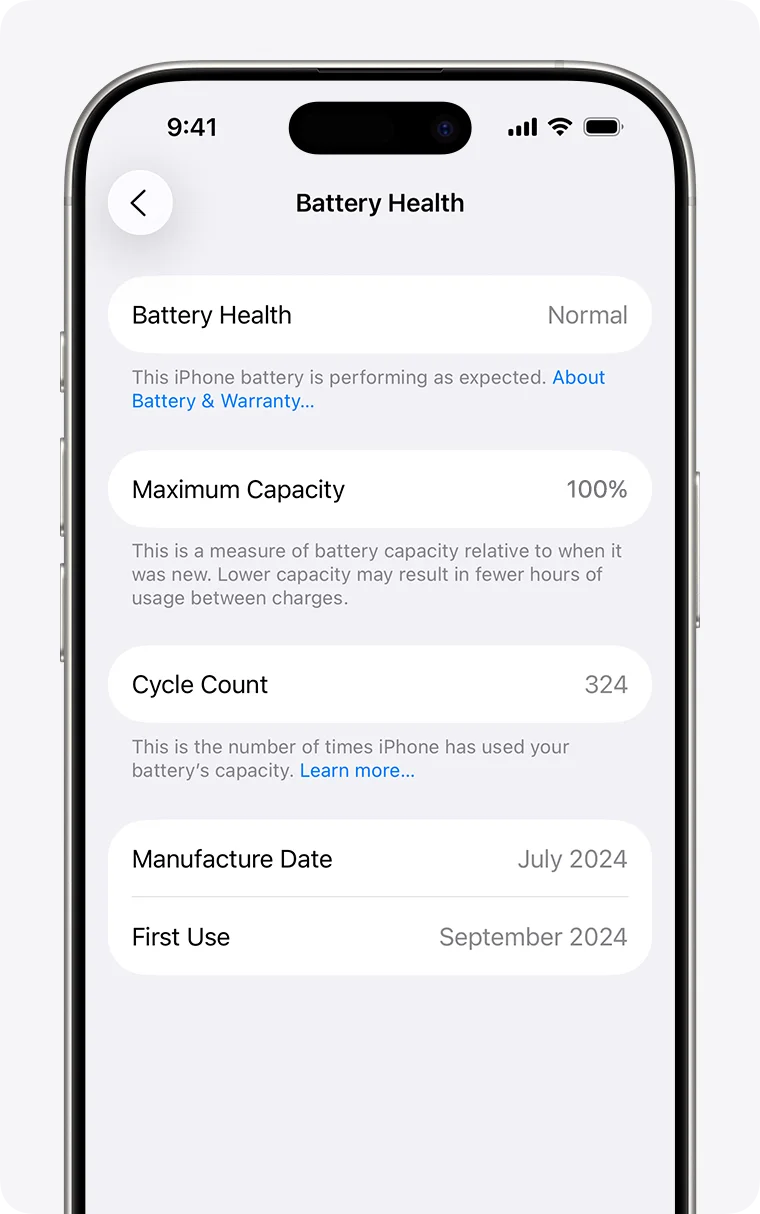
Here's the key point: iOS doesn't measure the battery chemistry directly the moment you open Settings. It trusts whatever the battery reports about itself. If someone rewrites that data, the phone will show what was written into it for a while — not what's actually true. ## How Battery Health gets artificially boosted
There are three ways the percentage gets "touched up," and we see all three on devices that come across our counter. The first and most common: reprogramming the measuring electronics. There are programmers and add-on boards on the repair-equipment market that connect to the battery flex and, in a few minutes, write in new values: health at 100%, cycle count back to zero, sometimes even the manufacture date. It's worth saying these tools aren't "fraud tools" by themselves — they're made for repair shops, so that after a genuine battery replacement the phone correctly recognises the new part and doesn't throw warnings. We have this kind of equipment on our own benches. The difference is intent: writing correct data for a battery that's genuinely being installed is one thing; writing "new" onto an old, worn-out battery so it can be sold that way is something else entirely. Second: an add-on board layered over the original electronics. Instead of rewriting the data, a small interposer board is glued onto the flex that constantly reports made-up values to the phone. This usually also hides the fact that the battery isn't genuine at all. This kind of setup is obvious the moment the phone is opened — but nobody buying a used phone off someone opens it first. Third: calibration tricks. A full discharge followed by a full charge can nudge the capacity estimate up a percentage point or two, so the phone looks better on the day of the sale than it really is. This isn't data tampering — it's exploiting how the estimate works — and that's exactly why it fades even faster. ## Why the percentage suddenly drops after a few days
Writing a new number into the chip doesn't change the cell's chemistry by a single milliamp-hour. A worn-out cell still holds exactly as much energy as it actually can. The measuring electronics, though, never stop working. With every charge and discharge cycle it re-measures how much energy actually went in and came out, and adjusts its estimate of full capacity to match. iOS periodically picks up that correction and lowers the displayed percentage. That's why a faked Battery Health reading doesn't fade gradually, the way normal ageing does (a few percentage points a year) — it drops suddenly, usually within the first few days to two weeks of use, once the estimate catches up with reality. There's also a sign you'll notice before you see it: the phone drains faster than the displayed percentage should allow, and it can even shut off around twenty percent, because the number on screen and the real state of the cell stopped describing the same battery. If any of this sounds familiar from your own experience, when it's actually time to replace an iPhone battery will help you judge how far along yours really is. ## How to check a phone before you buy it
No single check is foolproof, but together they raise the bar high enough that most doctored devices get caught before you pay. 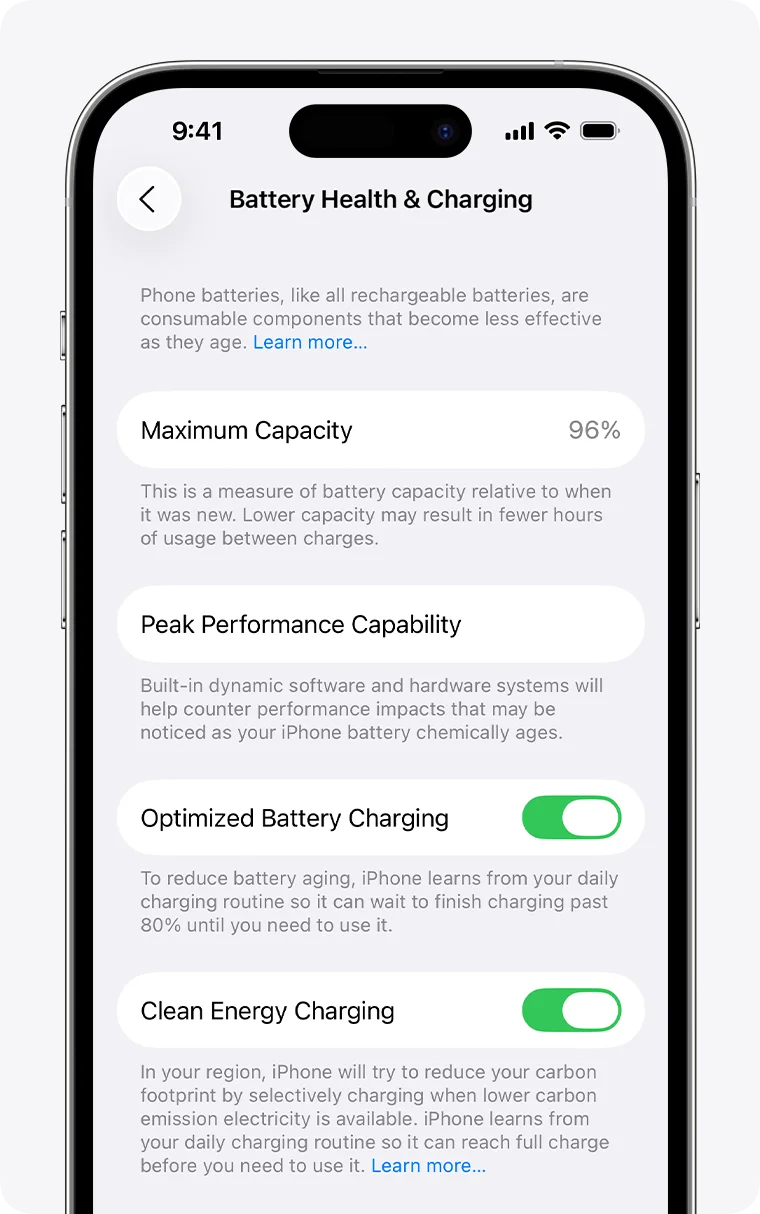
- Compare the percentage with the phone's age. A battery normally loses capacity every year. A phone that's two or three years old with exactly 100% and "zero issues" is a statistical outlier — and yet you'll see it suspiciously often in listings. Either the battery was genuinely replaced (fair question: with what battery, and where) or the percentage has been touched up. - Check the cycle count. On iPhone 15 and newer, the phone shows Cycle Count, the battery's manufacture date and its first-use date — on current iOS 26 all of it sits on one screen: Settings → Battery → Battery Health (available since iOS 17.4). Compare that with the seller's story: a "new battery" with four hundred cycles isn't new. On iPhone 14 and older, iOS still doesn't show the cycle count — only Maximum Capacity — but the cycles can still be read with service tools, which brings us to the last point. - Open Parts & Service History. The iPhone keeps its own parts history, and on current iOS 26 it's in the same place it's always been: Settings → General → About (available since iOS 15.2; for the battery since iPhone XS/XR, for the screen since iPhone 11, for the camera since iPhone 12). If a part was replaced, you'll see an entry — a genuine Apple part is labelled "Genuine Apple Part," a genuine part pulled from another device "Used," and an unrecognised part "Unknown Part." One caveat: a clean history isn't proof the phone was never opened, because the same tools that rewrite battery data can hide that trail too. In other words: an entry means a part was definitely replaced, but an empty history alone isn't a guarantee that nothing was. - Test battery life on the spot. Fifteen minutes of normal use — camera, mobile data, brighter screen. If the percentage visibly drops faster than the displayed "health" suggests it should, the reading and reality don't match. - Most reliable: a pre-purchase check at a repair shop. We offer this as a separate paid service — check the price and book a slot by phone; the procedure itself is quick. We use a service programmer to read the battery's measuring-electronics data (cycle count, manufacture date, serial number) and cross-check it against itself and against how the phone actually behaves: "100%" alongside a three-year-old manufacture date and freshly reset cycles gives itself away. To be fair about the limits of this check too: no reading alone can catch a thoroughly rewritten battery with total certainty — that's why we pair it with a physical inspection, and in practice a fake almost always leaves at least one inconsistency somewhere. A serious seller won't mind this kind of check; getting nervous at the mention of a repair shop is itself an answer. ## What to do if you already bought a phone with a "doctored" battery
First — document it. Take screenshots of the percentage right away, then every few days. A sharp drop in the first weeks is exactly the pattern described above, and it's a strong argument in a conversation with the seller, on top of whatever rights you have as a buyer. Second — the phone isn't a write-off. The battery is a consumable part, and it gets replaced. With us, an iPhone battery replacement takes 1 to 2 hours, current prices by model are on the iPhone battery replacement page, and the range for iPhone models currently runs 3,000 – 24,000 RSD — the exact amount depends on the model and the battery tier you choose (the full breakdown is in the price list). Genuine Apple batteries carry a 6-month warranty; other batteries carry 90 days. ## FAQ — frequently asked questions
Does 100% Battery Health guarantee the battery is new? No. The percentage is data the battery reports to the phone, and that data can be rewritten with the right equipment in a few minutes. A genuinely new battery pairs 100% with a low cycle count, a recent manufacture date and battery life that matches the percentage — with a doctored one, at least one of those won't line up. ### Why did Battery Health suddenly drop a few days after I bought a used iPhone? Because the battery's measuring electronics re-measure the real capacity with every charge cycle and correct their estimate, and iOS picks up that correction and updates the display. The "100%" that was written in then drops to the real figure. Normal ageing looks different — a few percentage points a year, not tens of percent in two weeks. ### Can I see the charge cycle count on my iPhone? On iPhone 15 and newer — yes: on current iOS 26, go to Settings → Battery → Battery Health, which also shows the battery's manufacture date and first-use date (available since iOS 17.4). On iPhone 14 and older, iOS doesn't display the cycle count, but it can be read with a service programmer — which we do as part of a battery check. ### Can Parts & Service History be faked too? The trail in the parts history can be hidden with the same class of tools that rewrite battery data. So treat an entry in the history seriously, but don't read a clean history as proof everything is genuine. A physical inspection at a repair shop is the reliable confirmation. ### What does a battery check at your shop involve, and what does it cost? A pre-purchase check is a paid service — check the price and book a slot by phone (065/362-61-31); the procedure itself is quick. We use a service programmer to read the battery's measuring-electronics data (cycles, manufacture date, serial number), compare it with what iOS displays and with how the phone behaves under load, and tell you whether the picture adds up. Just come by with the seller — we're in New Belgrade, and you can book a slot here. ### What if the battery genuinely is near the end — how long does a replacement take and what's the warranty? An iPhone battery replacement with us takes 1 to 2 hours. Genuine Apple batteries carry a 6-month warranty; other batteries carry 90 days — we track warranties in our own records, so you don't need any paperwork for a claim, just your name and phone number. Prices by model are on the iPhone battery replacement page. ## Buying a used iPhone? Check it before, not after
A faked Battery Health reading is a scam that counts on one thing: that the buyer only looks at a single number on a single screen. The moment you look wider — cycles, dates, parts history, real-world battery life — the whole construction falls apart. We've worked on phones since 2004, and we run pre-purchase checks every day — call to check the price. Book a slot or call now: 065/362-61-31.